qwen-audio-agent
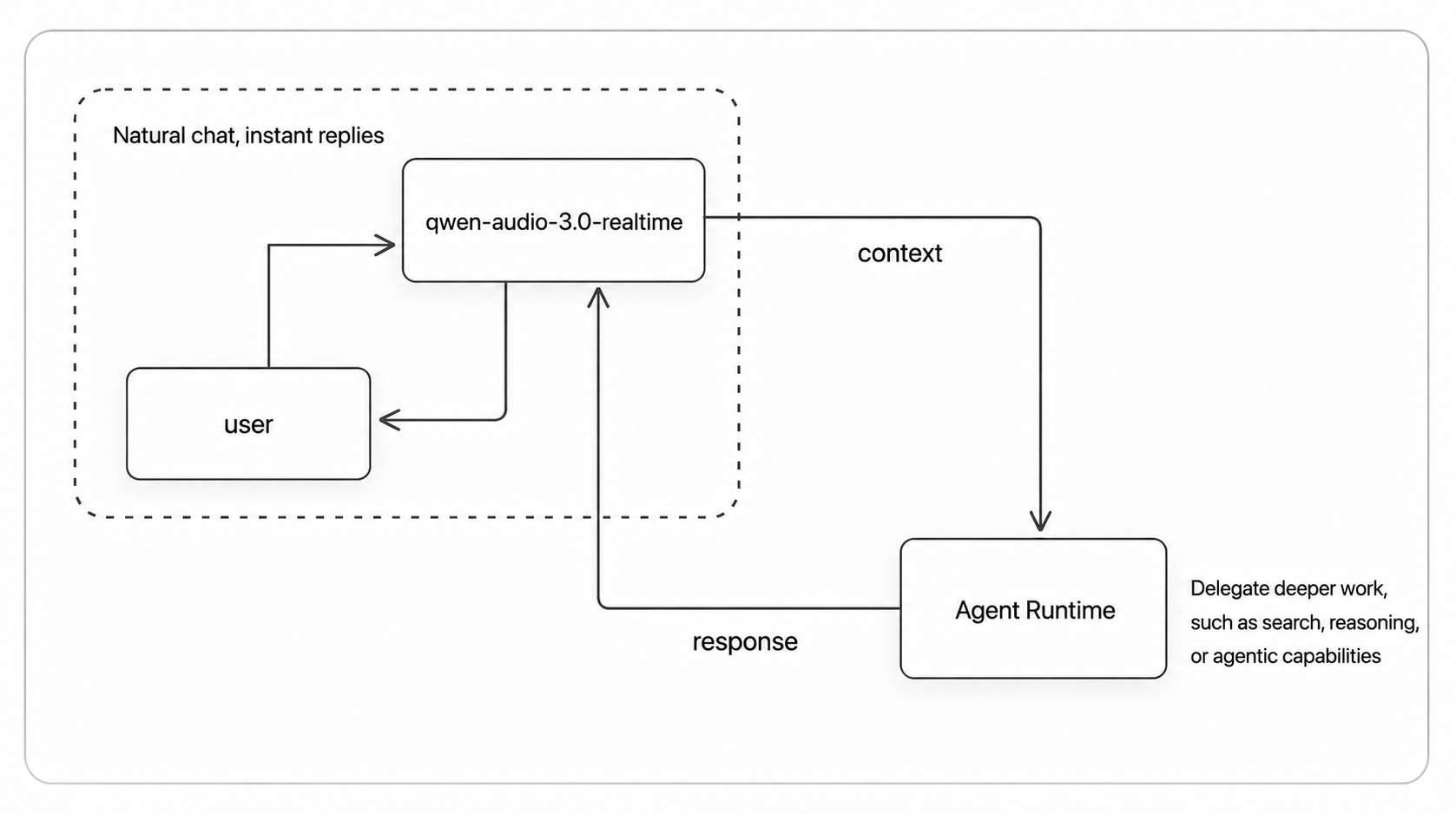
qwen-audio-agent is a realtime voice runtime that keeps AI agents present in conversation while delegating tasks to backend agents. It solves the problem of conversation stalling during tool use or long-running tasks by running frontend voice chat and background tasks in parallel. It is for developers building voice-enabled desktop or embedded agent applications.
✨ Key features
- Full-duplex realtime voice interaction with natural interruption
- One-click integration with preferred backend agents (Qwen Code, OpenCode, etc.)
- Parallel frontend conversation and background task execution
- Multiple independent asynchronous tasks with status tracking
- Task results automatically return to conversation for follow-up
- WebUI, terminal TUI, and desktop floating orb (macOS/Windows/Linux)
🎯 Use cases
- Desktop productivity: voice chat while delegating file work and code changes
- Smart cockpit: vehicle control, navigation, music, weather via voice
- VoiceMem: replace personal memory with semantic or audio-native memory
- Customer support: issue clarification, order lookup, ticket creation
📦 Installation
🧰 Requirements: Requires Node.js 22.22.2+ or 24.15.0+, npm 10+. For cloud voice frontend, a DashScope API key is needed; local speech-to-speech frontend requires no cloud key.
npm install -g qwen-audio-agent
For building from source, installing from GitHub, and obtaining a DashScope API Key, see the installation guide.
🚀 Usage
- Create your config and fill in the API Key:
qwenaudio config
DASHSCOPE_API_KEY=your-key
# Voice frontend model: Audio Flash/Plus or Omni Flash/Plus (Audio Plus is default)
QWEN_AUDIO_REALTIME_MODEL=qwen-audio-3.0-realtime-plus
# Backend Agent: optional, leave empty or set to none for frontend-only mode
AGENT_PROTOCOL=openclaw
# Backend model: optional; explicit values use standard ACP, empty reuses Agent config
QWEN_AUDIO_AGENT_BACKEND_MODEL=qwen3.7-max
- Start the Gateway, then open another terminal to start the TUI (or use
qwenaudio webuifor the browser UI):
qwenaudio        # Terminal 1: Gateway
qwenaudio tui    # Terminal 2: TUI
⚠️ Good to know
The project is under active development with v2.0.0 in progress; some backend agent integrations are rated four stars indicating active development or not fully verified.
❓ FAQ
What Node.js version is required?
Node.js 22.22.2+ or 24.15.0+, and npm 10+.
Can I use it without a cloud API key?
Yes, you can switch to a local speech-to-speech frontend that requires no cloud API key.
Which backend agents are supported?
It supports Qwen Code, OpenCode, OpenClaw, Qoder, Kimi Code, Hermes, CodeBuddy, Codex, Claude Code, DeepSeek, and Pi, among others.
How do I run the desktop app?
Download the installer from the releases page or build from source using npm run desktop:build:local (macOS), desktop:build:win (Windows), or desktop:build:linux (Linux).
📊 Repository
🤖 Overview, features, install steps and FAQ were generated from the project's README on Sep 4, 2026. Always check the original source before running commands.