JARVIS
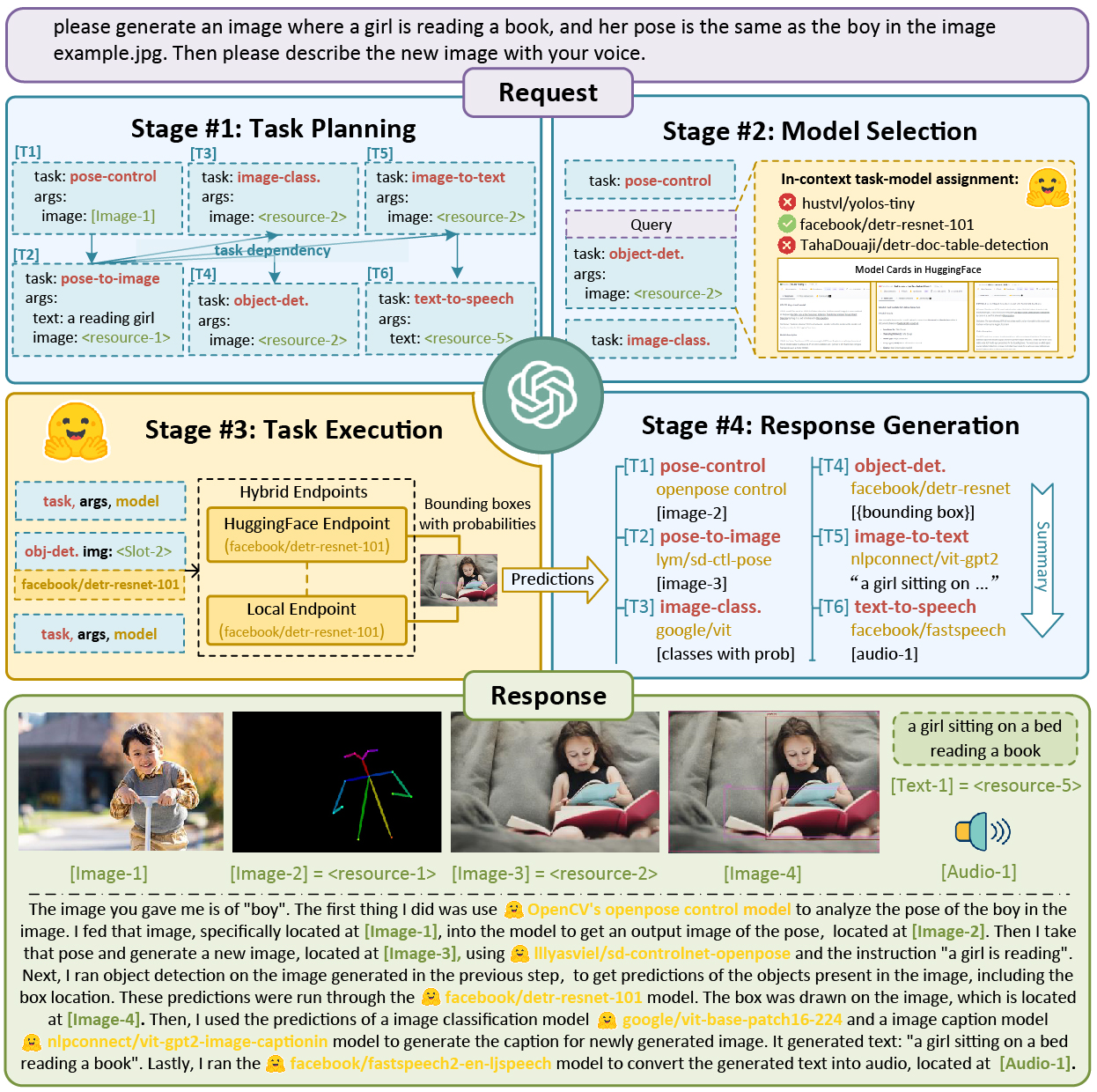
JARVIS (HuggingGPT) is a collaborative system that uses an LLM as a controller to plan and execute AI tasks by selecting and invoking expert models from HuggingFace. It solves the problem of connecting multiple AI models to handle complex requests, and is intended for developers and researchers exploring AGI and building AI agents.
✨ Key features
- LLM-based task planning and model selection
- Integrates with HuggingFace expert models
- Supports local, HuggingFace, and hybrid inference modes
- Provides server, web, Gradio, and CLI interfaces
- Includes TaskBench and EasyTool for evaluation and tool usage
- Supports OpenAI GPT-4 and Azure OpenAI service
🎯 Use cases
- Solve complex AI tasks like image generation, captioning, and object detection
- Automate multi-step workflows by chaining models
- Evaluate task automation capabilities of LLMs with TaskBench
- Enhance LLM-based agents with concise tool instructions using EasyTool
📦 Installation
🧰 Requirements: Requires Python 3.8, PyTorch, and an OpenAI API key and Hugging Face token. For local model deployment, Ubuntu 16.04 LTS with sufficient VRAM (>=24GB) and RAM (>=12GB) is recommended.
cd server
conda create -n jarvis python=3.8
conda activate jarvis
conda install pytorch torchvision torchaudio pytorch-cuda=11.7 -c pytorch -c nvidia
pip install -r requirements.txtcd models
bash download.sh # required when `inference_mode` is `local` or `hybrid`.cd ..
python models_server.py --config configs/config.default.yaml # required when `inference_mode` is `local` or `hybrid`
python awesome_chat.py --config configs/config.default.yaml --mode server # for text-davinci-003🚀 Usage
# CLI mode example
cd server
python awesome_chat.py --config configs/config.default.yaml --mode cli

# Then interact with Jarvis, e.g.,
# [ User ]: Please generate a canny image based on /examples/f.jpg
⚠️ Good to know
The project is under active development; the README notes that evaluation and project rebuilding are planned, and a new version will be released. Some features may be unstable, especially when relying on remote HuggingFace Inference Endpoints.
❓ FAQ
What are the different inference modes?
The inference_mode can be local (only local endpoints), huggingface (only HuggingFace Inference Endpoints), or hybrid (both).
What are the local deployment scales?
local_deployment can be minimal (RAM>12GB, ControlNet only), standard (RAM>16GB, ControlNet + Standard Pipelines), or full (RAM>42GB, All registered models).
How do I configure my OpenAI and HuggingFace credentials?
Replace openai.key and huggingface.token in server/configs/config.default.yaml with your personal keys, or set them as environment variables OPENAI_API_KEY and HUGGINGFACE_ACCESS_TOKEN.
Can I run JARVIS without downloading models locally?
Yes, use the configs/config.lite.yaml configuration which does not require local model downloads, but it is restricted to models running on HuggingFace Inference Endpoints.
📊 Repository
🤖 Overview, features, install steps and FAQ were generated from the project's README on Sep 4, 2026. Always check the original source before running commands.