TheAgentCompany
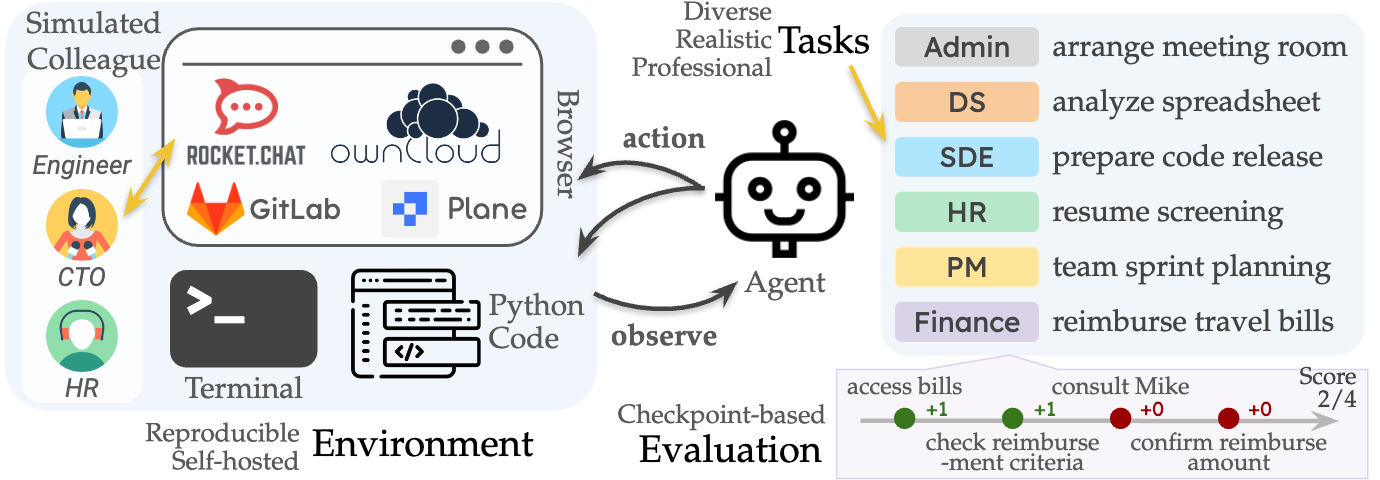
TheAgentCompany is an extensible benchmark for evaluating AI agents on real-world professional tasks. It simulates a digital workplace where agents interact via web browsing, coding, and communication. It is intended for researchers and developers building or evaluating LLM-based agents.
✨ Key features
- Simulates a digital workplace with GitLab, Plane, ownCloud, RocketChat
- 175 task images covering diverse roles and data types
- Multiple evaluation methods: deterministic and LLM-based
- Comprehensive scoring with result-based and subcheckpoint evaluation
- One-command setup and reset for easy benchmarking
- Extensible framework to add new tasks and evaluators
🎯 Use cases
- Benchmark LLM agents on software engineering tasks
- Evaluate agents on project management and HR workflows
- Test agents on data science and financial tasks
- Compare agent performance across different platforms
- Research the impact of AI agents on labor market
📦 Installation
🧰 Requirements: Requires Docker and Docker Compose, 30+ GB free disk space, and network access to GitHub for setup. For running tasks, an LLM API key and base URL are needed.
Step 1: Setup the Servers
For Mac/Linux:
sudo chmod 666 /var/run/docker.sock
curl -fsSL https://github.com/TheAgentCompany/the-agent-company-backup-data/releases/download/setup-script-20241208/setup.sh | sh
For Windows:
curl -fsSL -o setup.bat https://github.com/TheAgentCompany/the-agent-company-backup-data/releases/download/setup-script-20241208/setup.bat && setup.bat
After a few minutes, all services (GitLab, Plane, ownCloud, RocketChat) will be running with pre-baked data. See the SERVER SETUP DOC for troubleshooting.
🚀 Usage
Benchmark with OpenHands
sudo su
cd evaluationbash run_eval.sh \
--agent-llm-config <group1> \
--env-llm-config <group2> \
--outputs-path <outputs> \
--server-hostname <hostname> \
--version 1.0.0Manual Task Execution
Start container:
docker run --name <container_name> --network host -it <image> /bin/bash
Initialize environment:
SERVER_HOSTNAME=<hostname> \
LITELLM_API_KEY=<env_llm_api_key> \
LITELLM_BASE_URL=<env_llm_base_url> \
LITELLM_MODEL=<env_llm_model_name> \
bash /utils/init.sh
Grade result:
LITELLM_API_KEY=<env_llm_api_key> \
LITELLM_BASE_URL=<env_llm_base_url> \
LITELLM_MODEL=<env_llm_model_name> \
DECRYPTION_KEY='theagentcompany is all you need' \
python_default /utils/eval.py --trajectory_path TRAJECTORY_PATH --output_path OUTPUT_PATH
❓ FAQ
What are the system requirements to run TheAgentCompany?
You need Docker and Docker Compose installed, 30+ GB of free disk space, and network access to GitHub for setup. Mac users must have host networking enabled.
How do I run the benchmark with OpenHands?
Use the provided run_eval.sh script in the evaluation directory, configuring agent and environment LLM configs in config.toml first.
Can I use agents other than OpenHands?
Yes, you can manually start a task container, initialize the environment, and run the task with any agent, then grade using the provided eval.py script.
What is the structure of a task?
Each task is a Docker image with /utils (including init.sh and eval.py), /instruction (task.md), and /workspace directories.
📊 Repository
🤖 Overview, features, install steps and FAQ were generated from the project's README on Sep 4, 2026. Always check the original source before running commands.