OpenAgents
OpenAgents is an open platform for using and hosting language agents in everyday life, featuring three agents: Data Agent for data analysis, Plugins Agent with 200+ tools, and Web Agent for autonomous web browsing. It provides a chat-based web UI for general users and a full-stack codebase for developers to deploy locally and extend. It aims to bridge the gap between proof-of-concept agents and real-world applications.
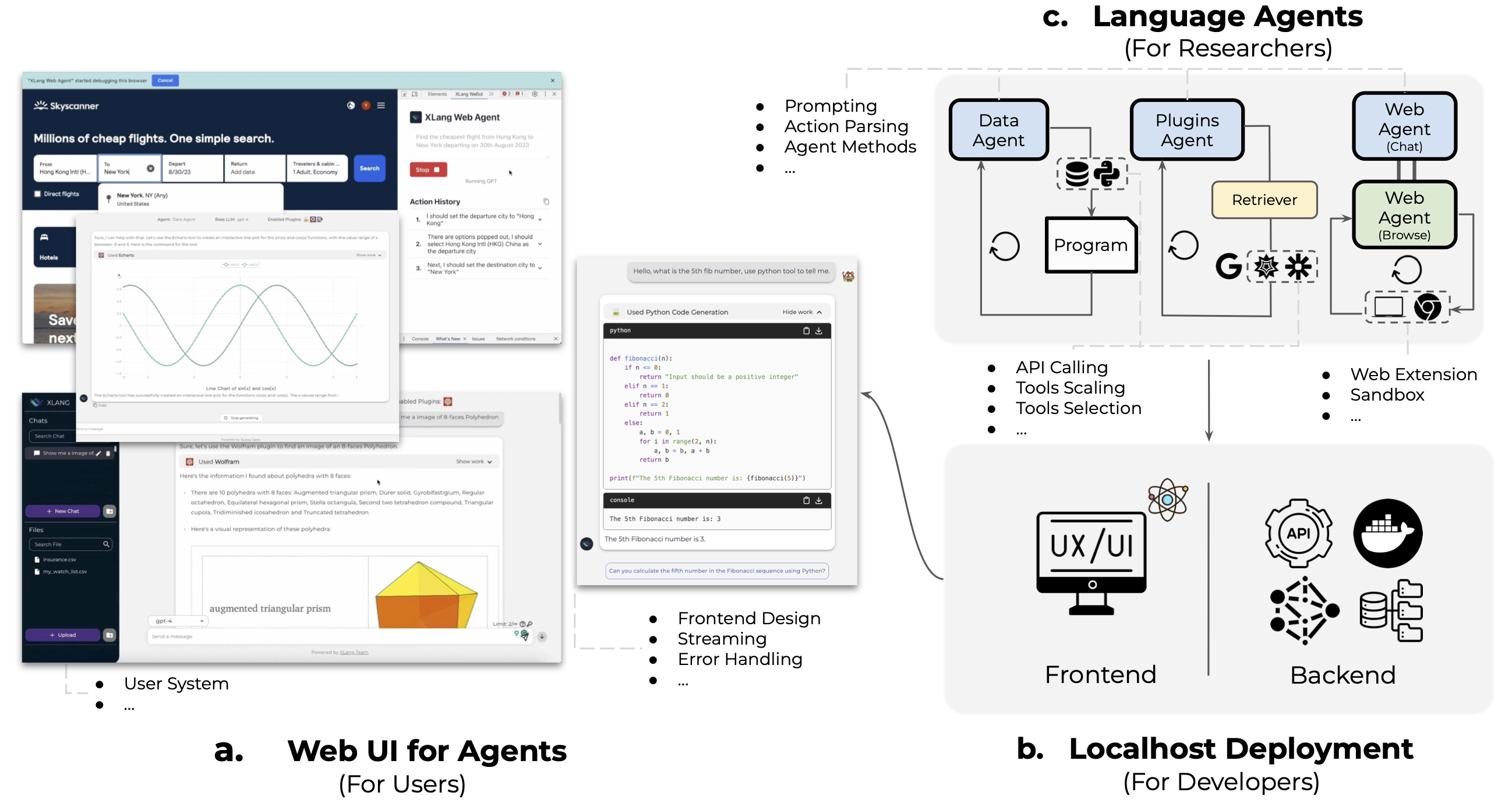
✨ Key features
- Data Agent for data analysis with Python/SQL and data tools.
- Plugins Agent with 200+ third-party plugins for daily tasks.
- Web Agent with Chrome extension for autonomous web browsing.
- Chat web UI optimized for swift responses and common failures.
- Full-stack codebase for easy local deployment and extension.
- Supports concurrent plugin usage and auto plugin selection.
🎯 Use cases
- Perform data analysis, manipulation, and visualization via chat.
- Use plugins for shopping, weather, scientific queries, and more.
- Automate web tasks like Google Maps navigation, Twitter posting, and form filling.
- Deploy a local instance of OpenAgents for research or development.
- Extend the platform with new agents, LLMs, or tools.
📦 Installation
🧰 Requirements: Requires Python, Node.js, and an OpenAI API key (or compatible service) for local deployment; Docker optional.
From Source Code
Check the following folders and README files to set up & localhost:
- Backend: the flask backend to host our three agents.
- Frontend: the frontend UI and WeBot Chrome extension.
Docker
Please follow the following steps to use the docker-compose to deploy the OpenAgents platform.
Note: the docker is under development, so there may be functions not working properly as expected and slower response. Please feel free to open an issue if you have any questions. If you want a more robust version, currently we recommend you to deploy from source code.
- If you want to use kaggle's dataset, you must modify the information in the Dockerfile to your correct information.
ENV KAGGLE_USER="" \
    KAGGLE_KEY=""
- If you are not running locally, you need to modify the accessible IP to the backend service in frontend/Dockerfile
ENV NEXT_PUBLIC_BACKEND_ENDPOINT http://x.x.x.x:8000
- Run the
docker compose buildcommand in the project root directory. - If you use openai unofficial services, such as FastChat,
🚀 Usage
For local deployment from source, refer to the backend and frontend READMEs. For Docker, after configuration, run:
docker compose build
docker compose up -d
Then access the web UI at http://localhost:3000 (or your configured endpoint).
⚠️ Good to know
The Docker deployment is under development and may have functions not working properly and slower response; for a more robust version, deploy from source code.
❓ FAQ
What are the three agents included in OpenAgents?
Data Agent for data analysis, Plugins Agent with 200+ tools, and Web Agent for autonomous web browsing.
How can I deploy OpenAgents locally?
You can deploy from source code by following the backend and frontend READMEs, or use Docker with docker-compose as described in the README.
Can I extend OpenAgents with a new agent or tool?
Yes, the README provides steps to extend a new agent, LLM, or tool, referencing the existing code structure.
Is there a free online demo?
Yes, OpenAgents hosts a free demo at https://chat.xlang.ai.
📊 Repository
🤖 Overview, features, install steps and FAQ were generated from the project's README on Sep 4, 2026. Always check the original source before running commands.