Burr
Apache Burr is a Python framework for building stateful AI applications like chatbots and agents by modeling them as state machines. It provides a UI for real-time monitoring and tracing, and integrates with any LLM or framework. It is for developers who need to manage complex decision-making workflows with persistent state.

🎬 Burr Introduction · DAGWorks-Inc
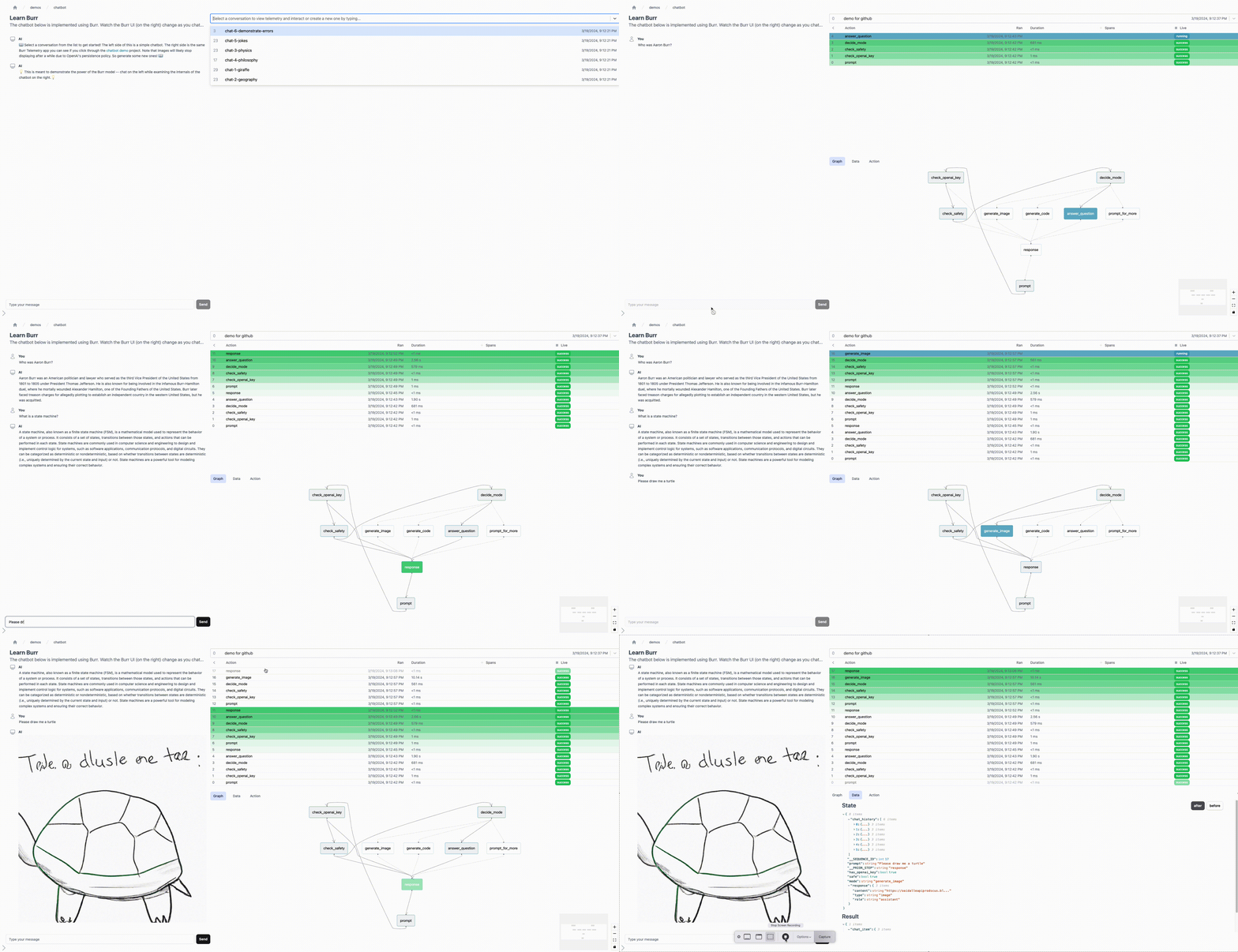
✨ Key features
- Express applications as state machines with simple Python functions.
- Includes a UI for real-time tracking, monitoring, and tracing.
- Pluggable persisters for saving and loading application state.
- Framework-agnostic; works with any LLM or library.
- Integrations with tools like Apache Hamilton and Streamlit.
- Open-source with Apache 2.0 license.
🎯 Use cases
- Build stateful chatbots with LLMs.
- Create RAG-based conversational agents.
- Develop LLM-powered adventure games.
- Build interactive assistants for email writing.
- Model non-LLM workflows like simulations or hyperparameter tuning.
📦 Installation
🧰 Requirements: Python 3.9+ for core library, 3.10+ for optional CLI; requires OPENAI_API_KEY for demo chatbot.
pip install "apache-burr[start]"
🚀 Usage
from burr.core import action, State, ApplicationBuilder

@action(reads=[], writes=["prompt", "chat_history"])
def human_input(state: State, prompt: str) -> State:
    chat_item = {"role": "user", "content": prompt}
    return state.update(prompt=prompt).append(chat_history=chat_item)

@action(reads=["chat_history"], writes=["response", "chat_history"])
def ai_response(state: State) -> State:
    response = _query_llm(state["chat_history"])
    chat_item = {"role": "system", "content": response}
    return state.update(response=response).append(chat_history=chat_item)

app = (
    ApplicationBuilder()
    .with_actions(human_input, ai_response)
    .with_transitions(
        ("human_input", "ai_response"),
        ("ai_response", "human_input")
    ).with_state(chat_history=[])
    .with_entrypoint("human_input")
    .build()
)
*_, state = app.run(halt_after=["ai_response"], inputs={"prompt": "Who was Aaron Burr, sir?"})
print("answer:", app.state["response"])
⚠️ Good to know
Apache Burr is incubating and does not support asynchronous event-based orchestration.
❓ FAQ
What Python versions are supported?
Core library supports Python 3.9+, but the optional CLI (included with [start], [learn], [cli]) requires Python 3.10+.
Can I use Burr with any LLM?
Yes, Burr is framework-agnostic and does not care how you query LLMs; you can integrate with any library.
Does Burr provide a UI?
Yes, Burr includes a UI for tracking, monitoring, and tracing your application in real time.
Is Burr open source?
Yes, it is released under the Apache 2.0 License.
📊 Repository
🤖 Overview, features, install steps and FAQ were generated from the project's README on Sep 4, 2026. Always check the original source before running commands.